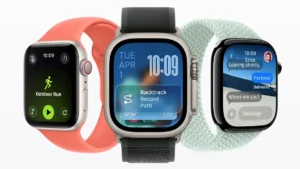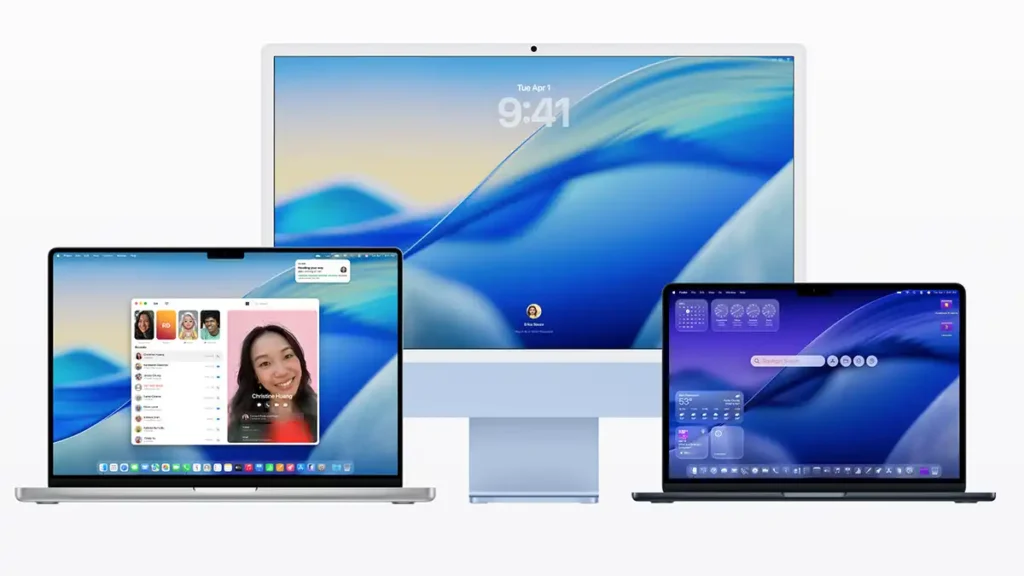
Apple unveiled at WWDC 2025 the latest version of its operating system for Mac, macOS 26, also known by the codename Tahoe. This release marks a significant change: for the first time, Apple has aligned version numbering with the year, jumping from macOS 15 directly to macOS 26 (indicating the year 2026) across all platforms: macOS, iOS, iPadOS, watchOS, tvOS and visionOS. In addition to the new naming convention, macOS 26 Tahoe brings a refreshed design, improved continuity between devices and a range of intelligent features that aim to make the Mac more powerful and easier to use.
Refreshed Design with “Liquid Glass”
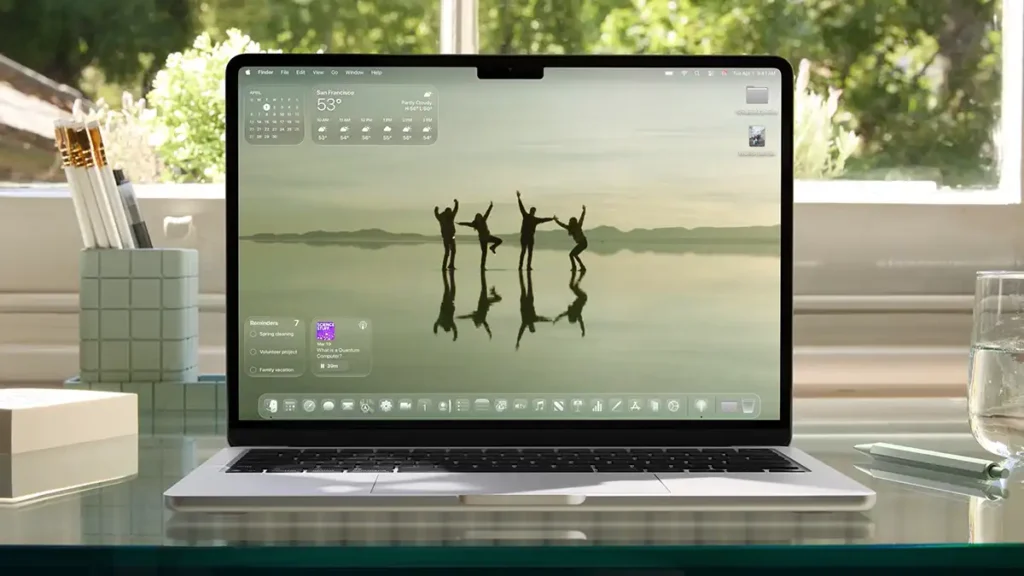
One of the first things that stands out in macOS 26 is its new look, the result of a unified design philosophy called “Liquid Glass”. This visual style is defined by transparency and fluid elements that react to context, making the interface feel more alive and immersive. macOS, iOS and iPadOS now share a similar visual language, reinforcing the sense of a cohesive ecosystem. Classic Mac elements like the menu bar, Dock and window toolbars have been redesigned: the menu bar is now fully transparent, and the Dock and sidebars blend more naturally with the background, putting the focus on content rather than the interface.
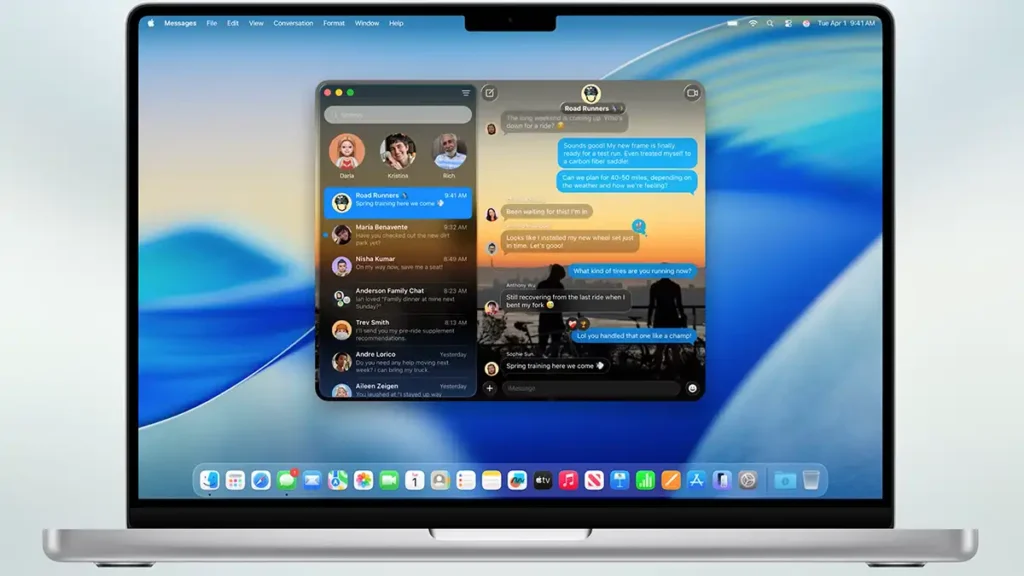
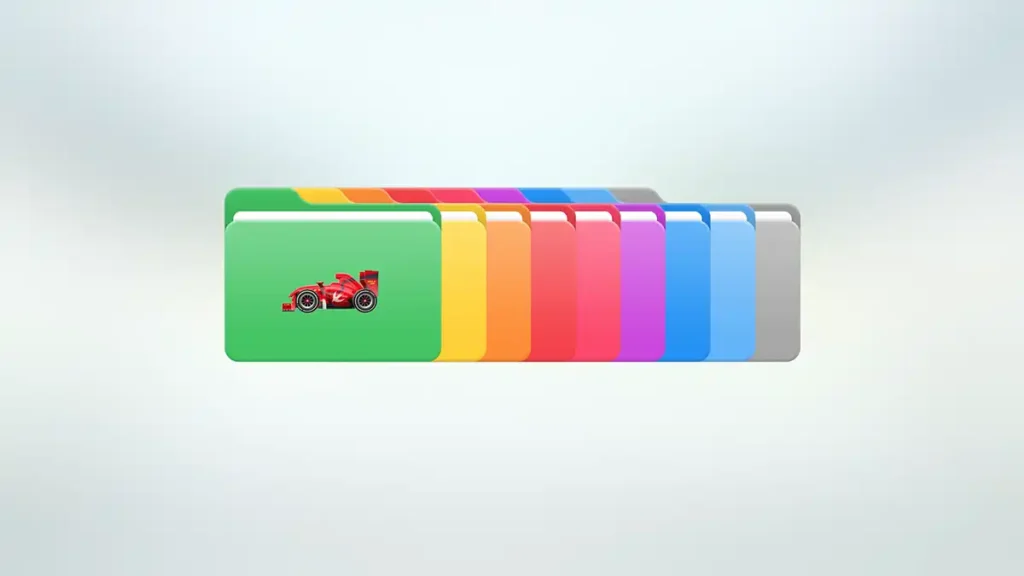
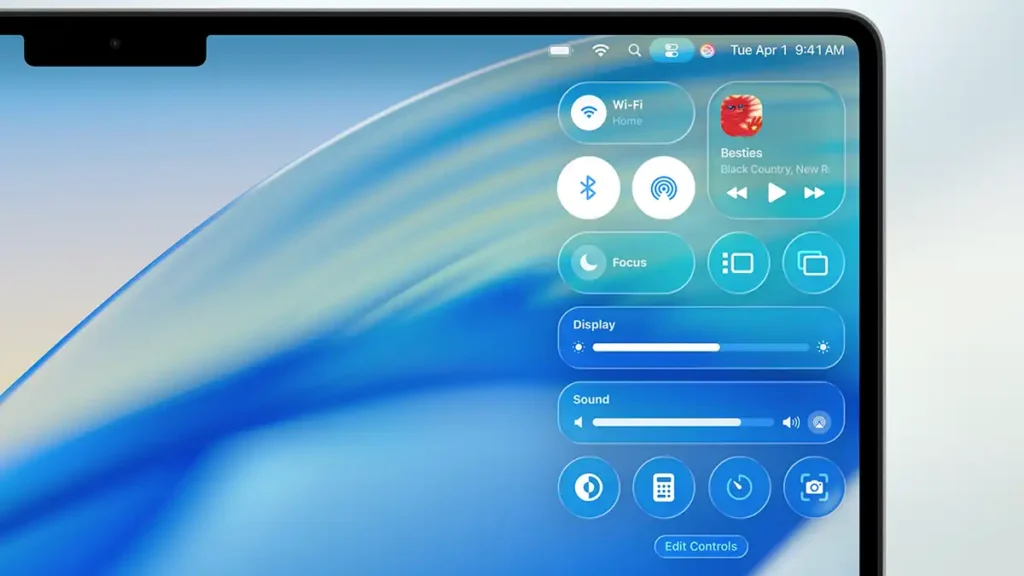
App icons also adopt the new Liquid Glass style, automatically adapting between light and dark mode for a more harmonious look. Personalization plays a bigger role in macOS 26: you can change the color of folders, app icons and widgets, tailoring the desktop environment to your taste. Even Control Center has been updated with a more personal design and additional options. The result is an interface that manages to be modern and delightful without feeling unfamiliar to long-time Mac users. With this redesign, Apple makes the Mac visually more expressive and customizable, keeping pace with the aesthetic evolution already seen on iPhone and iPad.
Expanded Continuity between Mac and iPhone
A major focus of macOS 26 is deepening integration between the Mac and other Apple devices through Continuity. The goal is to make switching tasks between iPhone, iPad and Mac more seamless than ever, bringing to the Mac experiences that were previously exclusive to the iPhone. Two highlights announced at WWDC 2025 illustrate this expanded continuity: the arrival of the Phone app on Mac and support for Live Activities in the macOS environment.

Phone App on Mac: native calls via Continuity
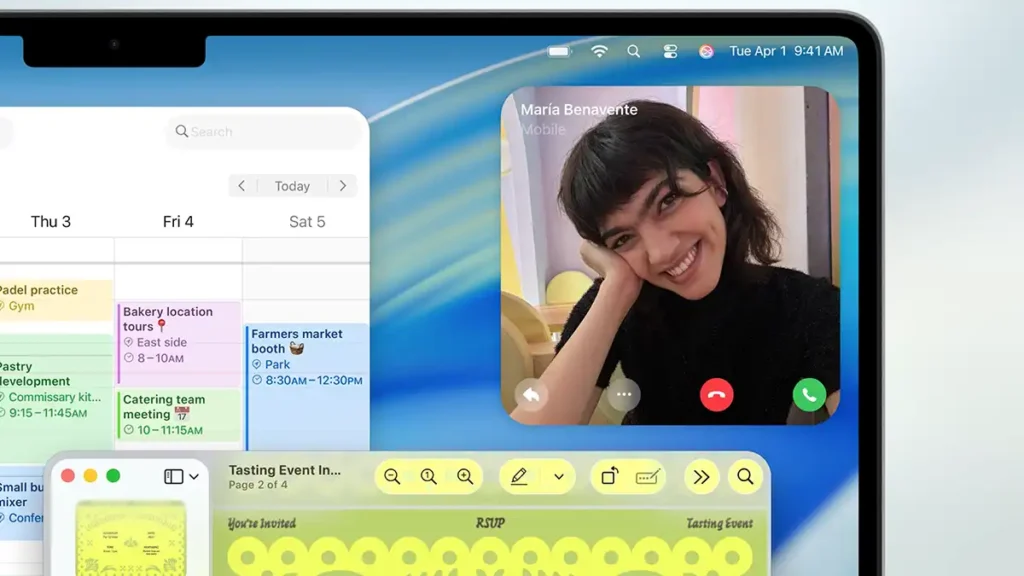
The Mac now has a native Phone app, allowing you to make and receive calls directly on the computer. Previously, it was already possible to answer iPhone calls on the Mac via Continuity, but now there is a dedicated app that replicates the full Phone experience from the iPhone on macOS 26. The Phone app on Mac includes familiar sections such as Recents, Favorites and Voicemail, all synced with the iPhone, providing full continuity for calls. If the iPhone is nearby, the Mac can act as a high performance phone, which is useful for answering quickly without picking up the physical device.
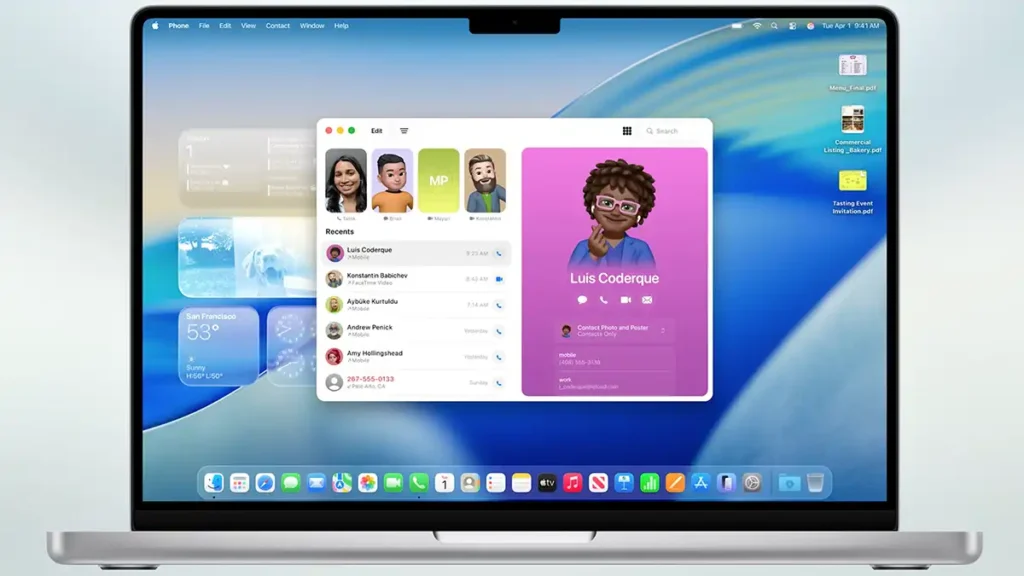
Even more impressive are the new call-related features. Call Screening can automatically answer calls from unknown numbers and ask who is calling, transcribing the reply in real time so you can decide whether to take the call. Hold Assist, in turn, comes into play when you are on hold: the Mac keeps the call active for you and alerts you when a human agent picks up, freeing you to keep working while you wait. These features, inherited from recent iPhones, now arrive in macOS 26 to make calls on the Mac more useful and efficient. Visually, incoming calls on the Mac are displayed with large Contact Posters, taking advantage of the bigger screen. In short, the Phone app on Mac further unifies the Apple ecosystem, allowing you to place and receive calls with all the modern conveniences directly on your computer.
Live Activities on Mac: real time info in the menu bar
Another continuity feature is the introduction of Live Activities from iPhone on the Mac. Live Activities are those interactive notifications on iOS that show continuously updated, real time information, for example the status of an incoming Uber, details of an upcoming flight or the score of a game in progress. With macOS 26, Live Activities from a nearby iPhone can now appear directly in the Mac’s menu bar, keeping you informed of what is happening in real time. So if you are on the Mac but ordered a ride on the iPhone, you can see the progress at the top of the Mac screen without having to pick up the phone.
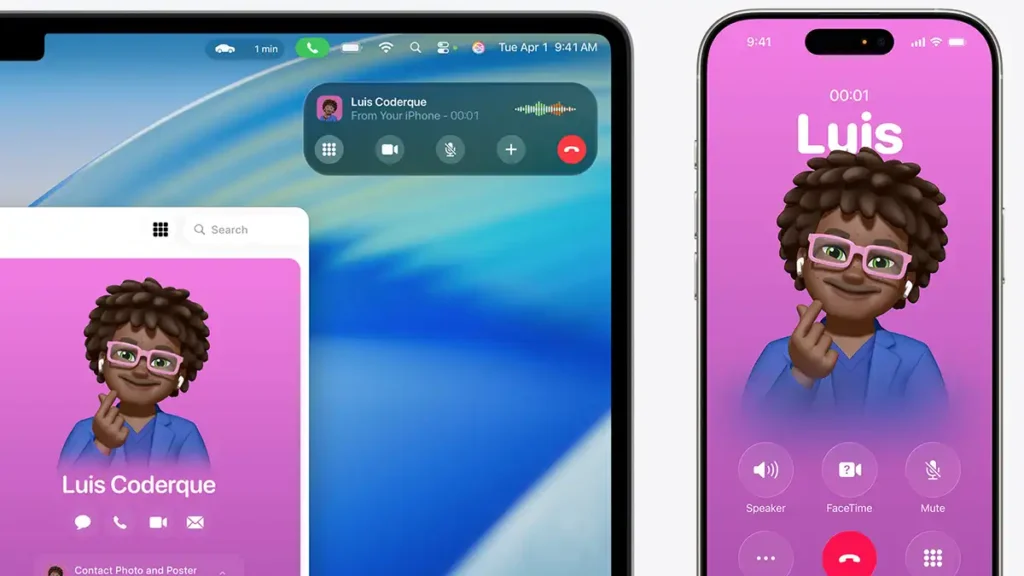
When you click a Live Activity shown on the Mac, macOS automatically opens the corresponding iPhone app via iPhone Mirroring, displaying more information and allowing interaction, all from the Mac. In other words, the Mac can temporarily mirror the iPhone app behind that Live Activity, so you can take actions (like cancelling a request or replying to a message) without leaving the computer. This integration works in the background thanks to the nearby iPhone, preserving the fluidity between devices. With Live Activities in the macOS 26 menu bar, Apple delivers an even more cohesive ecosystem where important events happening on the iPhone are immediately visible and actionable on the Mac in real time.
Spotlight Reinvented and Smarter
Spotlight, the macOS search system, has received what Apple calls “the biggest update ever” in this version. In macOS 26, Spotlight becomes more powerful, not only finding content more intelligently but also performing actions so you do not need to open other apps. The search experience has been redesigned to be more unified and contextual, when you run a search, all relevant results appear in a single list, whether they are files, folders, calendar events, emails, messages or apps, and the system ranks them intelligently by relevance. This means less time hunting for the right item, as Spotlight learns from your habits to present what matters most first.

New filter options let you quickly narrow results by type, for example, typing “type:PDF” or selecting the Messages filter makes it easier to find exactly what you are looking for. Spotlight can now also search within third-party cloud services such as Google Drive or OneDrive, surfacing files stored outside the Mac in the results. If you are not sure what you want, you can use browsing modes in Spotlight that let you visually explore installed apps, clipboard history or quickly list all recent files, acting as an advanced launcher.
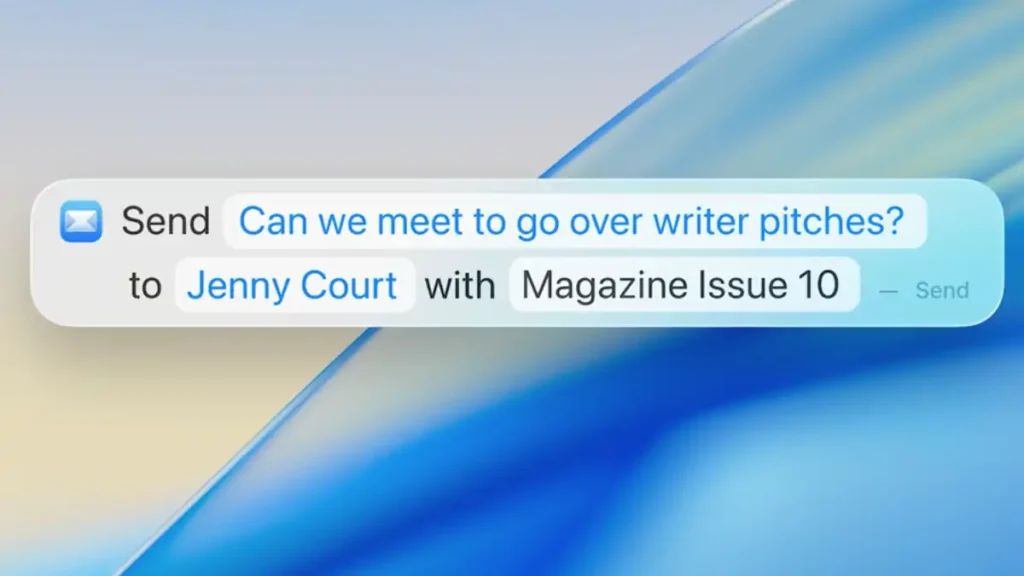
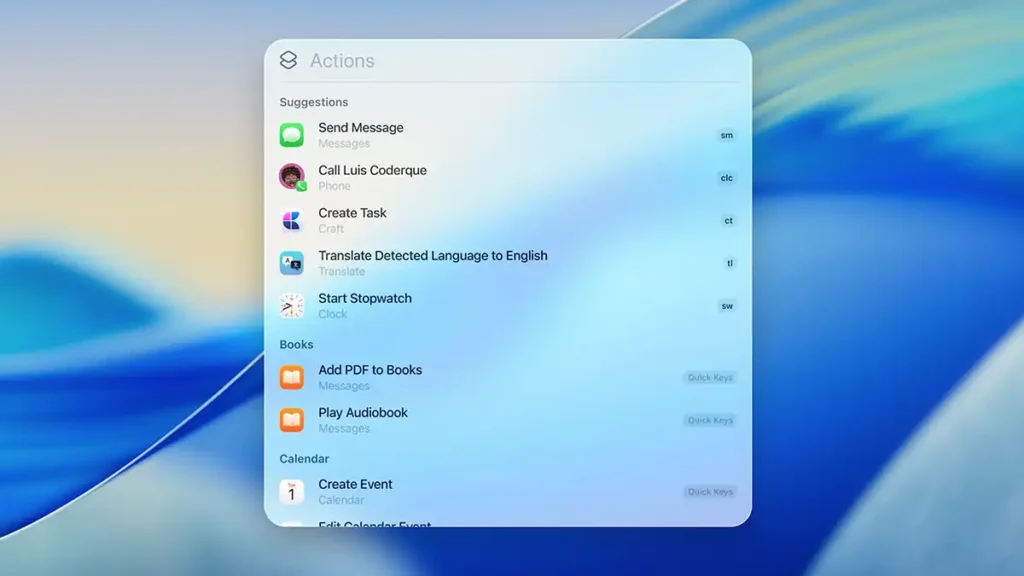
The major shift, however, is that Spotlight is no longer only passive, it is now actionable. You can perform hundreds of actions directly in Spotlight without opening separate apps. For example, you can start composing an email, create a note, play a song or podcast just by typing the command in search. These actions work with both Apple and third party apps, as developers can provide Shortcuts (via App Intents) that Spotlight recognizes. Additionally, Spotlight supports Quick Keys, small text shortcuts, for instance, typing “/mt” could trigger a specific shortcut you have set up, giving quick access to frequent functions. The system learns from your usage and can even suggest personalized actions, such as automatically proposing “send message to John” if it sees you usually contact that person at a certain time. In short, Spotlight in macOS 26 has evolved into a productivity hub, combining smart search with automation to make common tasks on the Mac much faster.
Smart Shortcuts and Creative Tools
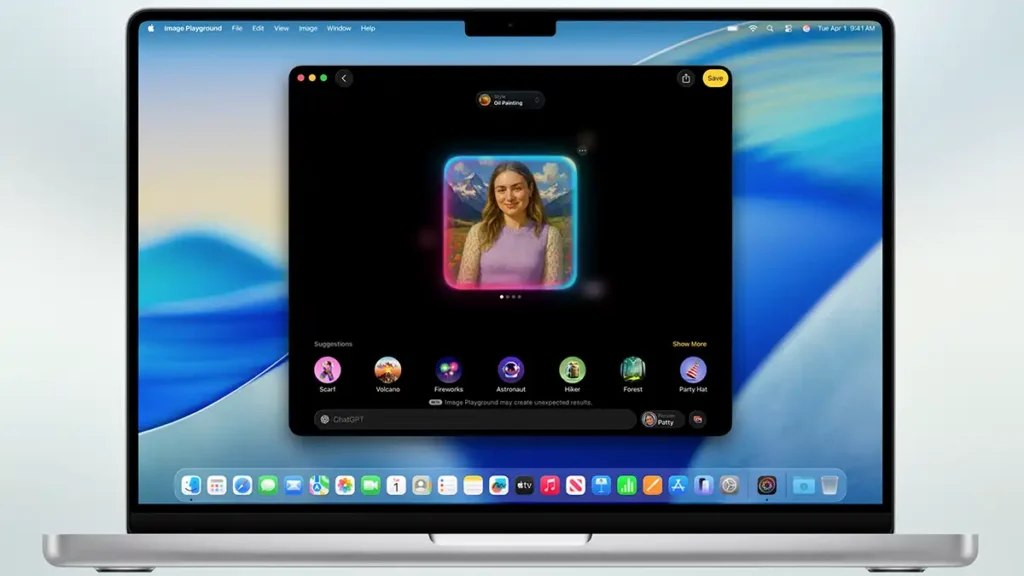
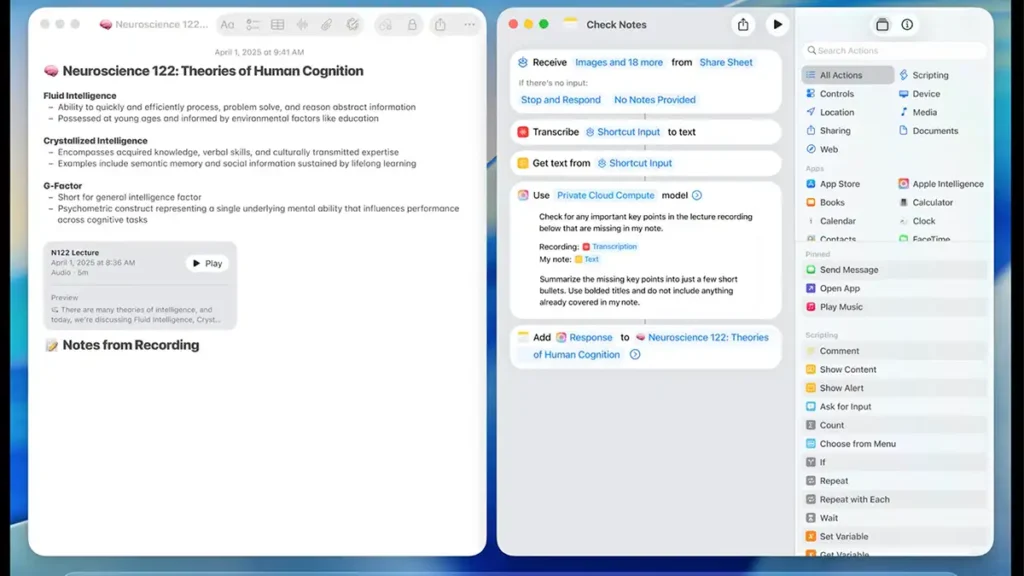
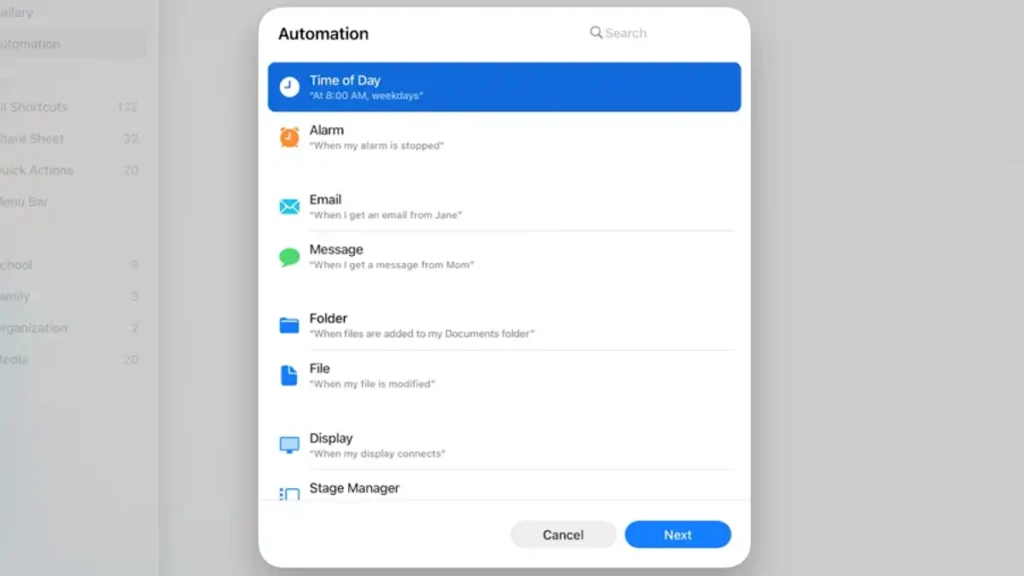
macOS 26 also boosts creativity and personal automation through improvements to the Shortcuts app, bringing AI into advanced workflows. A new class of intelligent actions is available to build more powerful shortcuts than ever. For example, you can create a shortcut that automatically summarizes a long text using AI-based writing tools, or one that generates an original image via Image Playground, all within the same flow. Apple even allows users to access advanced language models, either locally or via Private Cloud, to produce content or analyze data inside a shortcut, while always maintaining the privacy of the information involved. For those who want to tap into broader knowledge, there is even the option to connect to ChatGPT within a shortcut, pulling responses from OpenAI’s model and feeding them into automated actions. A student, for instance, could create a shortcut that compares an audio transcript of a lecture with their notes, using AI to identify missing key points.
The possibilities for personal automation become practically limitless, now with scheduling and automatic triggers: shortcuts can run on their own at a certain time or when a specific action occurs (such as saving a file in a folder or connecting a monitor).
Apple Games and Gaming Improvements on Mac
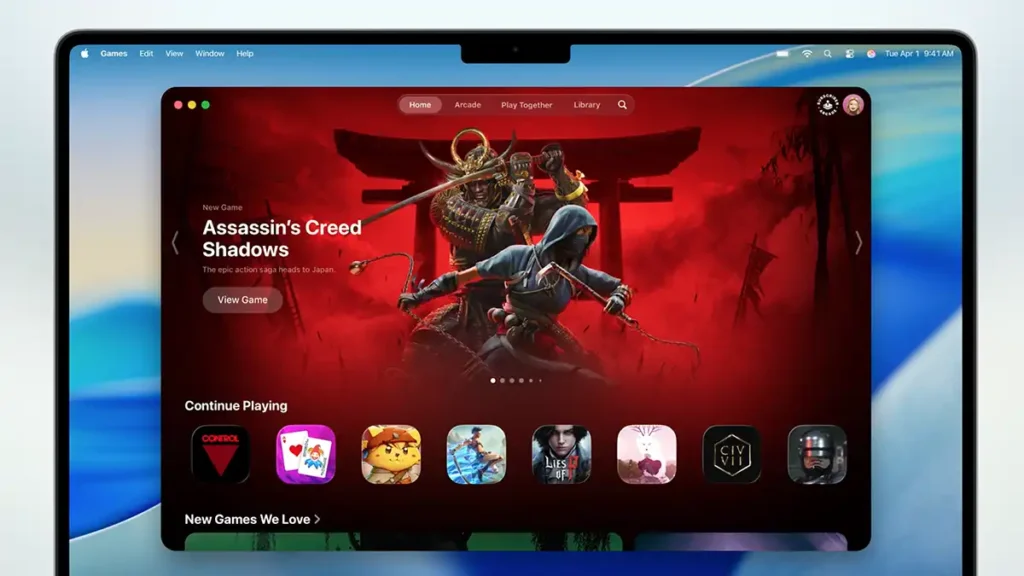
Traditionally, gaming has not been the Mac’s strongest area, but that has been changing, and macOS 26 takes a big step forward. Apple announced a new Apple Games app dedicated to players on Mac, bringing all games together in one place and introducing typical gaming world features into the Apple ecosystem. The Games app acts as a central hub, you can view your full library of installed titles, along with personalized recommendations for new games based on your preferences. It also facilitates social gaming thanks to built in tools for multiplayer invites and integrated chat.
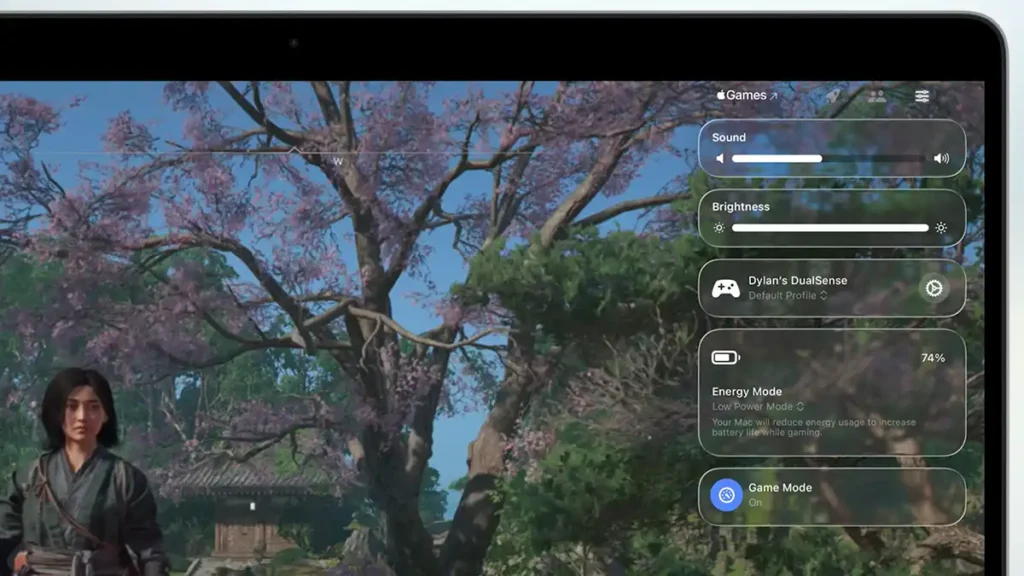
One of the most celebrated additions is a native Game Overlay in macOS. Similar to overlays on Windows or Steam, the Game Overlay lets you access system settings or chat functions without leaving the game. With a simple shortcut, players can adjust volume, check battery level, send a message to a friend or invite them to play, all overlaid on the running game. This avoids interruptions and makes the Mac gaming experience closer to that on dedicated gaming PCs.
For laptops, macOS 26 also includes a Low Power Mode for games that reduces battery impact during gaming sessions, extending play time away from the charger. Apple says this mode balances performance and battery life, enabling longer gaming sessions on MacBooks without sacrificing too many frames.
Unsurprisingly, Apple highlighted several high-profile titles coming to the Mac that take advantage of these technologies. Demanding games such as Cyberpunk 2077, Lies of P: Overture, HITMAN World of Assassination and Crimson Desert are among the upcoming macOS releases, underscoring Apple’s commitment to attracting major developers. In summary, macOS 26 aims to make the Mac more appealing for gaming by giving users a centralized experience (with the Games app), familiar gaming tools (overlay, battery mode) and strong technical support for next-generation titles. It is a clear sign that “gaming on Mac” is becoming less of a punchline and more of a reality on par with other platforms.

Other Notable macOS 26 Features
Beyond the major changes above, macOS 26 Tahoe includes many other improvements and features across system apps and services, refining day-to-day use. Some of the additional highlights announced by Apple include:
- Revamped Safari: Safari in macOS 26 gets a refreshed yet familiar design, with rounded tabs that appear to “float” in the toolbar and a reorganized sidebar displaying saved items (like iCloud tabs and favorites) more clearly. According to Apple, Safari remains the world’s fastest browser, loading frequently visited sites 50% faster than Chrome. It also offers better battery life, with up to four extra hours of streaming video compared to Chrome, and improves privacy by enabling advanced anti-fingerprinting protection by default while browsing.
- Messages Improvements: The Messages app gains popular iOS features, making conversations more dynamic. You can now set custom backgrounds for chats, create interactive polls in group conversations to ease decision-making, and access a redesigned details view that organizes all shared content (photos, links, documents). In group chats, Messages now shows typing indicators that identify who is typing, helping avoid confusion. If a new person joins a group, you can quickly add them to Contacts directly from the chat. The messaging experience on Mac becomes richer and more closely aligned with that on iPhone.
- Journal App: Journal, previously announced on iOS, now arrives on the Mac. This app lets you keep a digital diary, recording daily memories and reflections with text and photos, all securely synced via iCloud. On the Mac, journaling is even more comfortable thanks to the physical keyboard and larger screen, ideal for long entries or browsing memories on a map with locations. You can maintain multiple journals by theme (for example, personal, travel, projects), and everything stays up to date across iPhone, iPad and Mac. Journal’s arrival on macOS encourages users to capture important moments of daily life easily on any device.
- Photos and Memories: The Photos app has been updated with a new design that incorporates Liquid Glass elements, ensuring a consistent look with the rest of the system. New customization and organization options include pinning favorite Collections in the sidebar for quick access to your most-used albums. Visible buttons now allow filtering and sorting photos in any view, making it easier to locate images by criteria (such as favorites or edited shots). You can also adjust thumbnail sizes for albums and collections, choosing to see more photos at a glance or larger images as you prefer. These improvements make managing your photo library more flexible and tailored to each user.
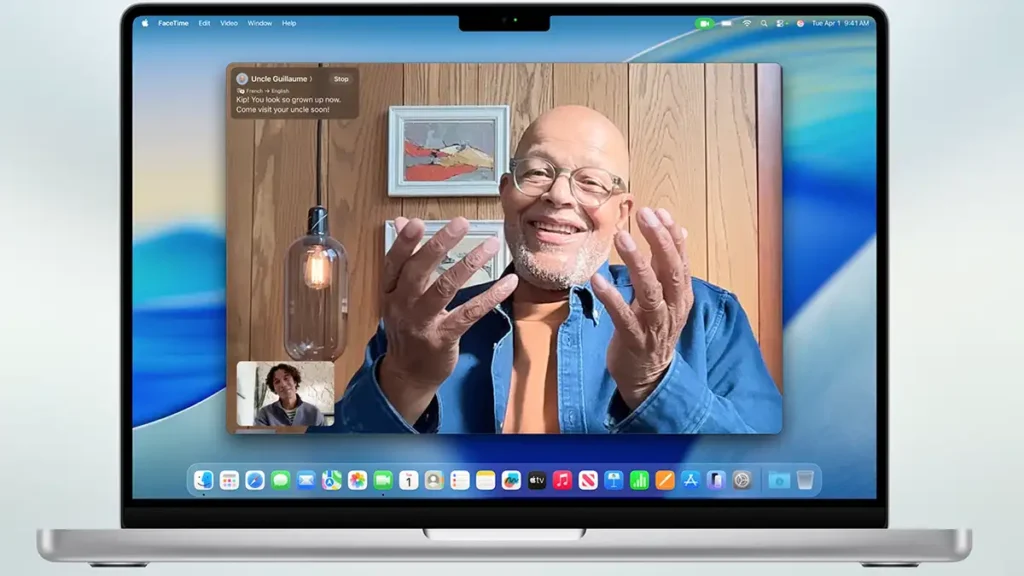
- Enhanced FaceTime: FaceTime’s home screen has been redesigned with aesthetics and usability in mind. When you open FaceTime, you now see Contact Posters for recent contacts prominently displayed, giving the app a more personal feel. Call controls have been rearranged: tools (mute, camera, etc.) float discreetly in the bottom-right corner over the video and automatically tuck away to avoid distractions, thanks to the Liquid Glass effect. A new “More” button provides quick access to features like SharePlay (screen or media sharing) and the aforementioned real time Translation during calls. Overall, FaceTime looks more elegant and is easier to use, tying together new translation and collaboration features with an updated design.
- Notes and Call Transcription: The Notes app now supports importing and exporting notes in Markdown format, which is a big help for users who work with documentation on multiple platforms or want more portability for their writing. Another powerful feature: if you are on a phone call on the Mac (via the Phone app), you can record the conversation directly into a note with automatic audio transcription. That means interviews, meetings or even customer support calls can be saved as text for later reference using the system’s built-in speech recognition. This integration between Phone and Notes promises to be a valuable productivity tool.
- Advanced Accessibility: macOS 26 strengthens Apple’s accessibility commitment with several new tools. Highlights include Magnifier on Mac, which lets users with low vision use the iPhone camera (via Continuity) or USB webcams to magnify real-world objects on the Mac screen. Magnifier includes image filters to improve legibility (for example, boosting contrast) and even allows perspective correction when viewing a document or board at an angle, making reading easier even when you are not directly in front of it. Another addition is Accessibility Reader, a system-wide simplified reading mode designed for those with attention or vision difficulties; it extracts the main text from any app or page and presents it in a clean, adjustable layout. There is also a completely new experience for Braille display users, called Braille Access, offering an optimized and more intuitive interface when using braille hardware on the Mac. Finally, macOS 26 introduces Vehicle Motion Cues, which reduces motion-related animations and effects that may trigger motion sickness, useful for those who use the Mac in a moving car or bus. Together, these improvements ensure more people can use the Mac comfortably, tailoring it to their needs.
- Passwords and Security: The built-in password manager in macOS (accessible via Settings or Safari) is now more transparent. Users can view the change history for each password, checking previous versions and the dates when they were modified. This helps recover an old password if needed or simply track changes for security reasons. In addition, macOS 26 is expected to continue expanding Passkeys as a secure alternative to traditional passwords and strengthen privacy and data protection across the system, keeping the Mac a trustworthy environment.
Conclusion
macOS 26 Tahoe, introduced at WWDC 2025, shows that Apple is committed to evolving the Mac experience in a comprehensive way, from visuals to core functionality. With a new Liquid Glass design unifying the interface and offering greater personalization, users get a fresh environment without losing familiarity. Continuity improvements reinforce the Apple ecosystem, bringing iPhone conveniences (like the Phone app and Live Activities) to the desktop. Classic tools such as Spotlight have been revamped into true productivity allies, while built-in intelligence (real time translation, smart shortcuts, content generation) pushes the Mac’s capabilities to another level.
Apple has also paid special attention to gaming and accessibility, areas that were previously less developed on the Mac, making it a more complete platform for broader audiences.
In short, macOS 26 brings hundreds of new features and refinements that together make the Mac more capable, productive and intelligent than ever. Whether for work, communication, creation or entertainment, this update offers new ways to get things done efficiently and with style. Apple plans to release macOS 26 Tahoe as a free update in fall 2025 (after a summer beta period) for all compatible Macs, essentially models equipped with Apple Silicon (M1/M2/M3/M4) and some recent Intel Macs. If you own a supported Mac, you can look forward to this update to enjoy a more modern, integrated and powerful operating system that reflects the best Apple has to offer in desktop software. With this release, Apple takes a bold step toward the future, ensuring the Mac stays at the forefront of innovation and aligned with user expectations for years to come.