For iPhone and iPad users who want to format external drives connected to their device without needing a Mac, iOS 18 and iPadOS 18 bring very useful new features. This functionality was revealed to developers in Apple’s newly released operating systems.
Formatting drives in the Files app
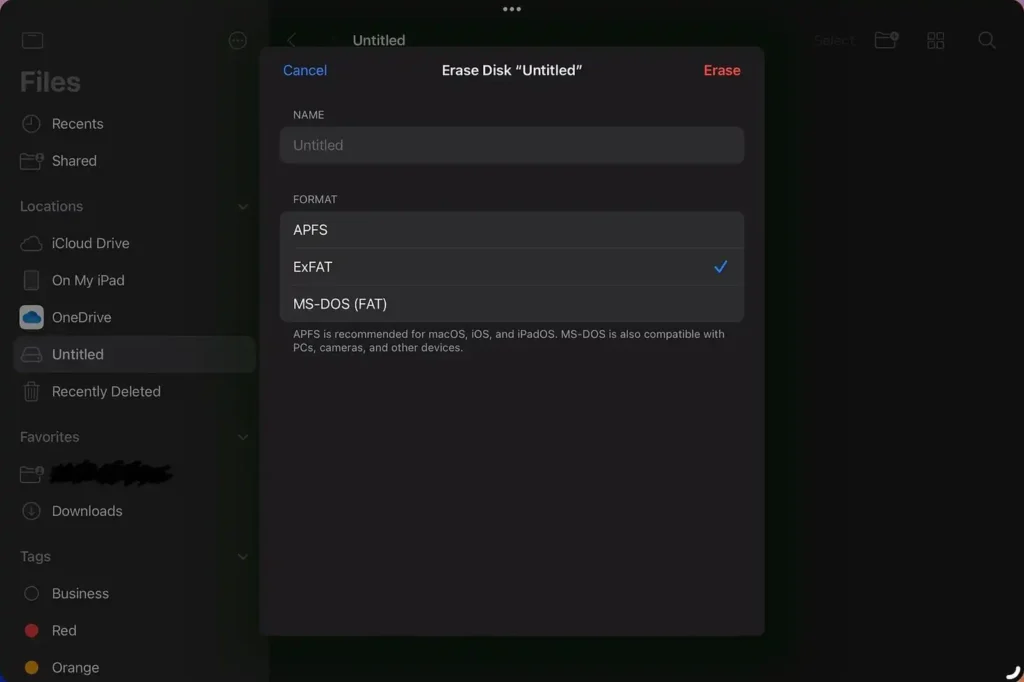
Now, when you right-click or long-press an external drive and select “Erase” in the Files app on iPadOS 18, new options appear to format the drive. Currently, there are three formats available, the same as in Disk Utility:
- APFS (with options for Case-sensitive or Encrypted)
- ExFAT
- MS-DOS (FAT)
With the exception of macOS extension formats, which are not useful for this feature on iPadOS. Throughout the iPadOS 18 beta cycle, it will be interesting to see what new improvements arrive for this functionality and others within the Files app.